Players
Players are the people and organisations in the case: the parties, their lawyers, witnesses, the court. Thea identifies them when it builds the timeline, with their role, type, side and importance.
Key players
Section titled “Key players”The Key players tab groups the players by camp, as Thea named them for this case (for example “Employee Camp”, “Employer Camp”, “Court”), or else by side. Each card shows the player’s name, role and description, their first events, and when they were active in the case.
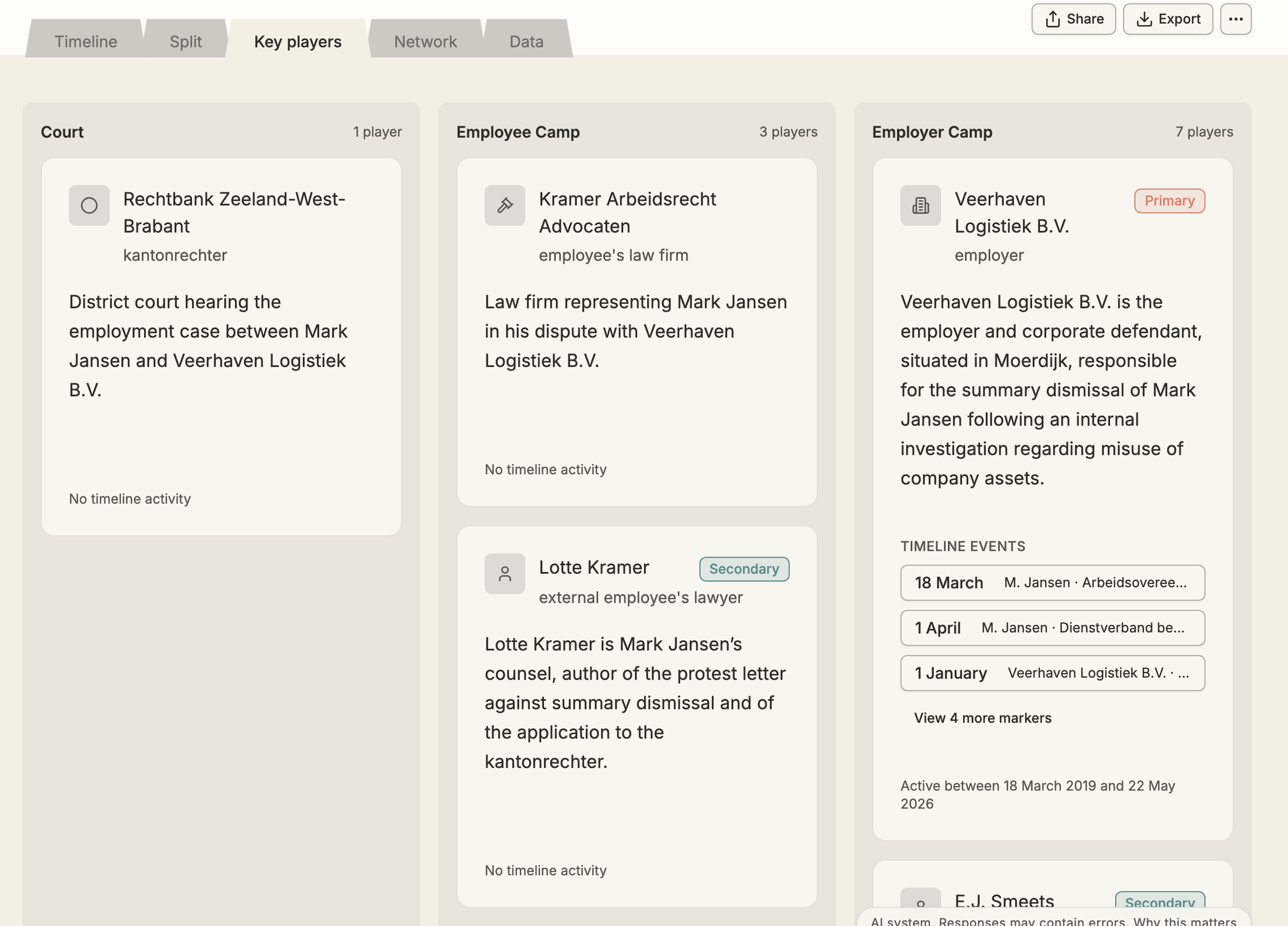
Click an event (or “View … more”) on a card to show only that player’s events. A bar at the top says Showing events for the player; click Clear filter to show everything again.
Add a player
Section titled “Add a player”Open the Data tab, go to Players and click Add Player. Enter the Name, Role (for example plaintiff, witness) and Description, and click Add Player.
Edit a player
Section titled “Edit a player”In Data → Players, click a cell (name, role, description or camp) to edit it and press Enter. A player’s type, side and importance are set by Thea.
To link a player to an event, open the event, click Edit and add the player under Players.
Delete a player
Section titled “Delete a player”In Data → Players, click the bin icon. Thea tells you how many event links and relationships are removed with the player.